
- IoT home automation connects your lights, fans, locks, and cameras to the internet so you control them remotely or on a schedule — no manual switching needed.
- A basic smart home setup needs three things: a smart device, a Wi-Fi router, and a hub or smartphone app.
- According to Statista 2026, the global smart home market is worth US$159.5 billion — this is mainstream technology, not a luxury experiment.
- You can start IoT home automation for under ₹1,000 with one smart plug — no electrician, no rewiring required.
- IoT Mail Bridge covers smart home, automation, and connected device topics to help Indian beginners get started without the jargon.
How IoT Home Automation Works: A Beginner’s Guide
Smart devices generate data every second. But most homeowners never use that data to actually automate their lives. This guide from IoT Mail Bridge explains exactly how IoT home automation works — from the device to your phone — and how to set it up in your Indian home without spending a fortune.
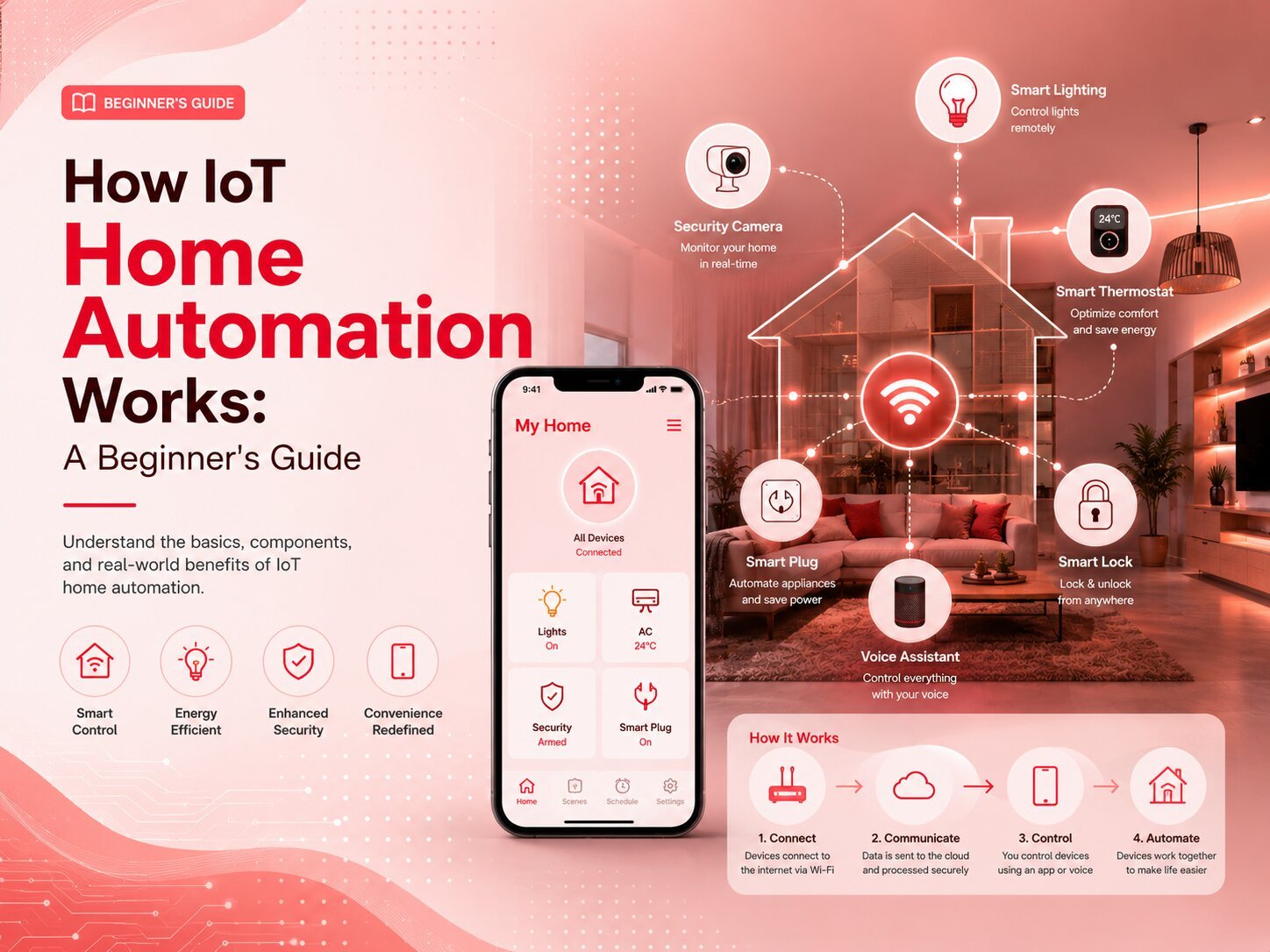
What Is IoT Home Automation?
IoT home automation means using internet-connected devices to control your home’s physical systems — lights, fans, air conditioning, door locks, security cameras, and appliances — automatically or remotely from your phone. The “IoT” stands for Internet of Things: everyday objects fitted with sensors and Wi-Fi chips that send and receive data.
A regular tubelight has one job: switch on, switch off. A smart bulb connected to your Wi-Fi can change brightness, set colour temperature, turn off automatically at midnight, and send your phone an alert if someone accidentally left it on while you were away.
That is how IoT home automation works at the device level — and the same logic scales to every appliance in your home. Just as IoT email automation closes the gap between what devices detect and what teams know, IoT home automation closes the gap between what your home is doing and what you want it to do.
IoT Mail Bridge covers connected device technology for Indian homes and businesses. This guide focuses specifically on residential smart home setup — from the first device to a fully automated routine.
The Core LogicHow Does IoT Home Automation Actually Work?
IoT home automation works through four connected layers: the device (a sensor or actuator), the network (Wi-Fi, Zigbee, Z-Wave, or Bluetooth), the cloud or local hub (where data is processed and rules run), and the user interface (your phone app or voice assistant). A command from your phone travels through all four layers in under one second.
Here is what happens when you say “turn off the living room light” to your Google Home device:
- Your voice assistant captures the command and sends it to Google’s cloud server.
- The cloud server identifies which device “living room light” refers to in your home.
- It sends an off command to your smart bulb via your home Wi-Fi router.
- The bulb switches off and sends a confirmation back to the app — done in under a second.
This four-layer architecture is consistent across all smart home systems — Google Home, Amazon Alexa, Apple HomeKit. The brand changes; the principle does not.
| Layer | What It Does | Example |
|---|---|---|
| Device | Collects data or performs physical action | Smart bulb, smart plug, motion sensor |
| Network | Moves data between device and hub | Wi-Fi, Zigbee, Z-Wave, Bluetooth |
| Processing | Runs automation rules, stores data | Google Home hub, Amazon Echo, local server |
| Interface | Lets you control and monitor devices | Mobile app, voice command, dashboard |
What Devices Are Used in IoT Home Automation?
Smart home IoT devices fall into five main categories: lighting, security, climate control, energy management, and entertainment. Each category has budget options starting under ₹1,500 and premium options above ₹15,000. You do not need to buy all categories at once — most Indian users start with lighting or security.
How to Set Up IoT Home Automation at Home?
Setting up IoT home automation at home takes 3–6 hours for a basic 2-room setup. You need a stable 2.4GHz Wi-Fi connection, a smartphone, and your chosen smart devices. No electrician is needed for plug-and-play devices like smart bulbs and smart plugs.
Pick one platform: Google Home, Amazon Alexa, or Apple HomeKit. All your devices must support that platform. Mixing ecosystems causes compatibility problems that are painful to untangle later. Google Home has the widest device support in India as of 2026.
Buy one smart plug or smart bulb. Download the brand’s app, connect to your home Wi-Fi, and test controls from your phone. This confirms your router is compatible before you buy more devices. Many problems are caught here — better now than after buying ten devices.
A Google Nest Mini (₹3,499) or Amazon Echo Dot (₹3,499) gives you hands-free voice control. Once set up, both work with hundreds of Indian smart home brands. Both also support Hindi voice commands — useful for households where not everyone is comfortable typing on a phone.
In the Google Home or Alexa app, set up routines:
- Morning: Lights on at 6:30 AM, AC set to 24°C, geyser on for 20 minutes.
- Away mode: All lights off, cameras armed, smart lock status checked.
- Night: All lights off at 11 PM, main door lock verified automatically.
Add devices one category at a time. Test each device for a week before adding the next category. Never buy everything at once — it becomes difficult to troubleshoot when multiple new devices are all misbehaving simultaneously.
What Does a Basic IoT Home Setup Cost in India (2026)?
| Item | Approx. Cost | Notes |
|---|---|---|
| Google Nest Mini or Echo Dot | ₹3,499 | Voice control hub |
| 3 smart bulbs | ₹1,800 | Syska / Wipro Next |
| 2 smart plugs | ₹1,200 | Energy tracking included |
| 1 smart security camera | ₹2,500 | Qubo / Mi |
| Total starter setup | ~₹9,000 | No electrician needed |
What Are the Benefits of IoT Home Automation?
IoT home automation benefits include energy savings of 20–30% on electricity bills (per McKinsey Smart Home Report 2025), better security with live camera access, remote control of any device from anywhere, and a daily convenience that is difficult to give up after the first month.
Which IoT Home Automation System Is Best for India?
The best IoT home automation system for India in 2026 is Google Home for most users. It has the widest device compatibility, works well with Indian internet speeds, supports Hindi voice commands, and integrates with the most affordable Indian smart home brands including Syska, Wipro, and CP Plus.
| Platform | Device Support | Hindi Voice | Offline Capability | Starting Cost |
|---|---|---|---|---|
| Google Home | 1,000+ devices | Yes | Limited | ₹3,499 |
| Amazon Alexa | 800+ devices | Yes | Limited | ₹3,499 |
| Apple HomeKit | Certified only | English only | Strong | ₹8,900 |
| Matter (new standard) | Universal | Depends on hub | Strong | Varies |
Matter — the new universal IoT standard backed by Google, Amazon, and Apple simultaneously — is worth watching. As of mid-2026, devices with Matter certification work across all three ecosystems. For anyone buying now, Matter-compatible devices future-proof your setup.
ChallengesWhat Are the Real Challenges of IoT Home Automation?
The main challenges of IoT home automation are Wi-Fi dependency (no internet = no smart control), device compatibility issues between brands, upfront hardware cost, and cybersecurity risks if devices are not configured with proper passwords and network isolation.
Researchers at IIT Bombay’s systems security lab have pointed out that most consumer IoT devices in India ship with default passwords and receive no automatic security updates — meaning they can be compromised within 48 hours of connecting to an open home network. Their recommendation: change default credentials on every device, enable two-factor authentication on your hub app, and place all smart home devices on a separate guest Wi-Fi network isolated from your primary laptops and phones.
A 2024 consumer report by Digit.in also found that Indian users in Tier-2 cities with unstable internet experienced more device downtime than actual savings — suggesting IoT home automation delivers its full benefits only when paired with a reliable 100 Mbps+ connection. These are real trade-offs. IoT Mail Bridge recommends understanding them before buying — not after.
Is IoT Home Automation Safe and Secure?
IoT home automation is safe when set up correctly. The three most important security steps are: change all default passwords immediately after setup, enable two-factor authentication on your hub app, and place smart home devices on a dedicated guest Wi-Fi network separate from your phones and laptops.
According to a 2025 Kaspersky IoT threat report, 34% of IoT cyberattacks in Asia-Pacific targeted home routers — not the smart devices themselves. Securing your router matters as much as securing the device.
Smart Home Security Checklist
- Change default username and password on every smart device immediately after connecting it.
- Enable two-factor authentication on your Google Home, Alexa, or Apple ID account.
- Put all smart home devices on a guest Wi-Fi network (separate from your phones and laptops).
- Enable automatic firmware updates on every device — or check for updates monthly.
- Disable remote access features you do not use — fewer open ports means fewer entry points.
IoT Home Automation — Common Questions Answered
Start Small, Automate Gradually
How IoT home automation works is simpler than most people expect: a device, a network, a processing layer, and an interface. The technology is affordable, proven, and genuinely useful for Indian homes — whether you want to cut electricity bills, improve home security, or simply switch off the geyser remotely from your office.
The best approach is to start with one ₹600 smart plug or ₹500 smart bulb, get comfortable with the app and the concept, then expand category by category. IoT Mail Bridge will continue publishing device reviews, setup guides, and security tips to help you build a smarter home — step by step, without the jargon.
If you found this guide useful, share it with someone setting up their first smart home device. And check IoT Mail Bridge for new articles on smart home technology published weekly.
Ready to Start Your Smart Home?
IoT Mail Bridge publishes weekly guides on smart home devices, automation setup, and IoT security — written for Indian homes without the technical jargon.
Browse All Guides →